Tunisia Passport Photo Size & Requirements (Official 35×45 mm Guide 2026)
Official requirements and online tool to create a compliant Tunisia passport photo. Size: 35×45 mm (35×45 mm).
- ✔ Accepted by Tunisia consulates
- ✔ 100% compliance guarantee
- ✔ Create online in seconds
Tunisia passport applications require a specific photo that meets official government standards. Whether you're applying for a new passport, renewing an existing one, or updating your travel documents, having a compliant photo is essential for a successful application.
Tunisia passport applications are reviewed by immigration officials or their authorised representatives globally. In many countries, applications are additionally processed through accredited third-party centers such as VFS Global or BLS International. Photo compliance is checked against official biometric criteria, and even small errors — such as an incorrect background color or improper head positioning — can cause your application to be rejected outright.
This guide covers everything you need to know about Tunisia passport photo requirements, including the exact size specifications, background requirements, what to wear, and how to take a compliant photo at home.
Tunisia Passport Photo Requirements Summary
Photo Size
35×45 mm
Document Type
Passport
Tunisia
Complete Tunisia Passport Photo Requirements
To ensure your Tunisia passport photo is accepted without delays, follow these official requirements precisely. Even minor deviations can result in photo rejection.
Official Tunisia Passport Photo Size (35×45 mm)
The Tunisia passport photo must be exactly 35×45 mm (35×45 mm). This is a critical requirement — photos that don't match the exact dimensions will be automatically rejected.
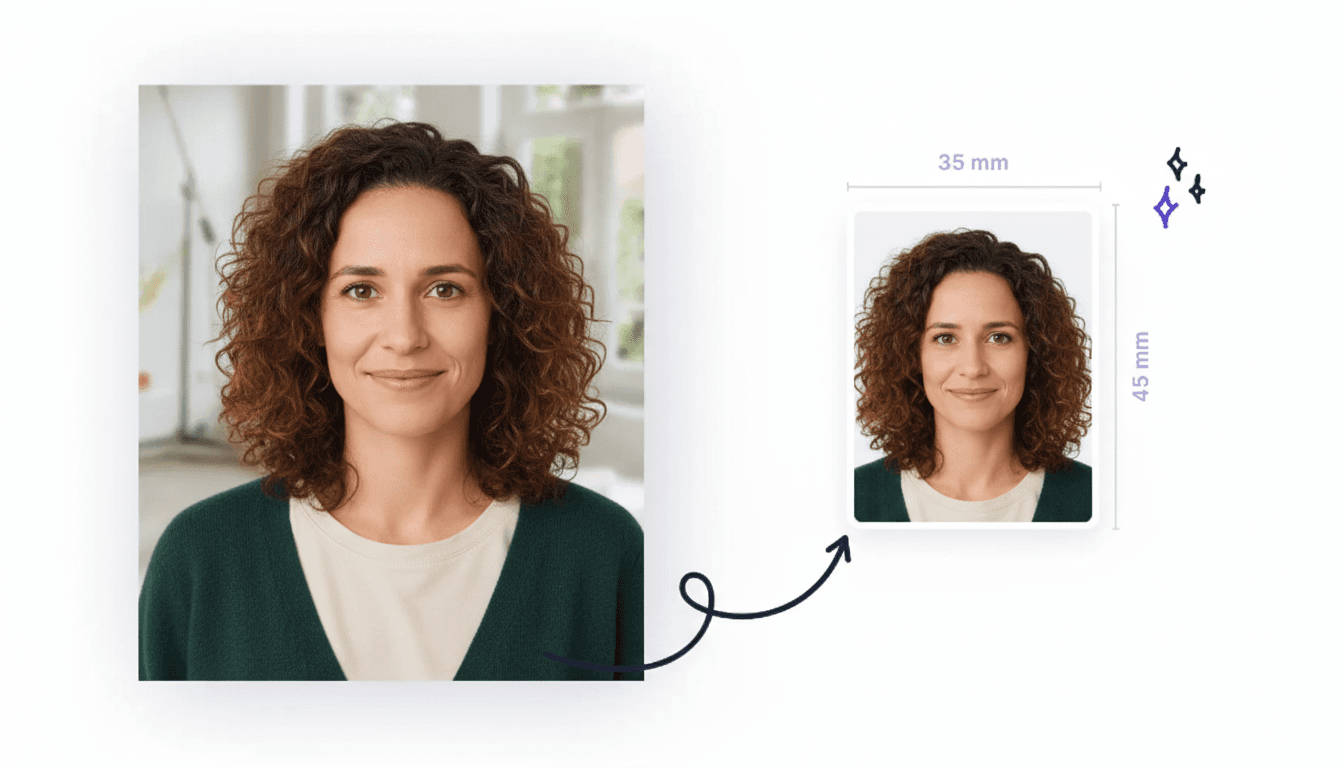
| Official Tunisia Passport Photo Size | 35×45 mm (35×45 mm) |
| Resolution | Minimum 300 DPI (dots per inch) for print quality |
| Format | Color photo (no black and white or sepia) |
| Head Size | Head should occupy 70–80% of the photo height |
Tunisia Passport Photo Background Requirements
The background is one of the most common reasons for photo rejection. Your Tunisia passport photo must have a plain, uniform background with no shadows, patterns, or other people visible.
- Background must be plain white or light-colored (light gray or cream may be acceptable)
- No shadows on the background or your face
- No patterns, textures, or decorations
- No other people or objects visible in the background
- Uniform color throughout with no gradients
- Even lighting with no harsh shadows or bright spots
Face and Expression Requirements
Your face must be clearly visible and positioned correctly in the frame:
- Face the camera directly with your head straight (no tilting)
- Neutral expression with your mouth closed (no smiling, frowning, or unusual expressions)
- Eyes must be open and clearly visible
- Look directly at the camera lens
- Head should be centered in the frame
- Shoulders should be visible in the photo
- Head size should be between 70–80% of the photo height
What to Wear for Tunisia Passport Photos
Your clothing should contrast with the background and follow these guidelines:
- Wear regular, everyday clothing (no uniforms or camouflage patterns)
- Clothing should contrast with the background (avoid white clothing on white background)
- No head coverings unless worn daily for religious purposes
- If wearing a head covering for religious reasons, your face must be fully visible from chin to forehead
- Head covering should not cast shadows on your face
- Avoid clothing with busy patterns or logos
Glasses and Accessories
Glasses are generally allowed, but there are specific requirements:
- Glasses are allowed if there's no glare or reflection
- Your eyes must be clearly visible through the lenses
- No tinted lenses (clear lenses only)
- Frames should not cover any part of your eyes
- Removal of glasses is recommended for best results
Photo Quality Requirements
The photo quality must meet professional standards:
- High resolution: minimum 300 DPI for printing
- Sharp focus with no blur or pixelation
- Color photo (no black and white, sepia, or filters)
- Recent photo (taken within the last 6 months)
- No digital alterations, filters, or retouching
- Proper exposure with no overexposed or underexposed areas
- Good color balance and natural skin tones
Tip
Step-by-Step Guide: How to Take a Tunisia Passport Photo
Taking a compliant Tunisia passport photo at home is easier than you might think. Follow these steps to ensure your photo meets all official requirements.
Step 1: Set Up Your Background
Find a plain white or light-colored wall with no decorations. If you don't have one, hang a plain white sheet behind you.
- Use a plain white wall or hang a white sheet
- Ensure no shadows are cast on the background
- Remove any objects or decorations from view
- Make sure the background is well-lit and uniform
Step 2: Set Up Proper Lighting
Good lighting is crucial for a quality Tunisia passport photo. Use natural light from a window or set up soft, even lighting.
- Use natural light from a window if available
- Avoid harsh overhead lighting that creates shadows
- Ensure your face is evenly lit with no dark spots
- Avoid using flash directly, as it can create harsh shadows
Step 3: Position Yourself Correctly
Stand or sit about 3–4 feet away from the background to avoid shadows.
- Stand 3–4 feet away from the background
- Face the camera directly with your head straight
- Keep your shoulders square to the camera
- Look directly at the camera lens
Step 4: Take the Photo
Use a smartphone or digital camera. Maintain a neutral expression with eyes open.
- Use a smartphone or digital camera (not a webcam)
- Take the photo at eye level or slightly above
- Have a neutral expression with your mouth closed
- Take multiple photos to choose the best one
Step 5: Edit and Format Your Photo
Use our online tool to crop to the exact size and ensure compliance with all Tunisia passport photo requirements.
- Upload your photo to our online tool
- Select the Tunisia passport preset
- Our tool will automatically crop to 35×45 mm (35×45 mm)
- Background will be corrected to meet requirements
- Download your compliant photo ready for submission
Common Mistakes to Avoid
Many Tunisia passport photo applications are rejected due to avoidable mistakes. Learn what to watch out for to get your photo accepted on the first attempt.
- Wrong photo size: Photos that don't match 35×45 mm / 35×45 mm will be rejected
- Incorrect background: Shadows, patterns, or non-uniform backgrounds are common rejection reasons
- Wrong expression: Smiling, frowning, or unusual expressions are not allowed
- Poor photo quality: Blurry, pixelated, or low-resolution photos will be rejected
- Glare on glasses: Ensure no reflection obscures your eyes
- Photo too old: Photos taken more than 6 months ago will be rejected
- Digital alterations: Filters, retouching, or other digital modifications are not allowed
- Wrong head size: Your head should occupy 70–80% of the photo height
- Head covering issues: If wearing a head covering, your face must be fully visible
- Wrong clothing: Uniforms or clothing matching the background can cause rejection
Tip
Create Your Tunisia Passport Photo Online
Our online Tunisia passport photo maker is the easiest and most reliable way to create a compliant photo. Simply upload your photo, and our tool will automatically ensure it meets all official requirements.
- Exact sizing: Crops your photo to exactly 35×45 mm (35×45 mm)
- Background correction: Fixes background, removes shadows and patterns
- Head positioning: Ensures proper head size (70–80% of photo height)
- Quality optimization: Exports at 300 DPI for professional print quality
- Instant preview: See your compliant photo before downloading
- Multiple formats: Digital version for online submission or print-ready version
Create Your Tunisia Passport Photo Now
Upload your photo and we'll make it compliant with Tunisia requirements in seconds
Free preview • $9.99 one-time HD download
Printing Your Tunisia Passport Photo
Once you've created your compliant Tunisia passport photo, you'll need to print it if submitting a physical application. Here are your printing options:
Option 1: Print at Home
- Use high-quality photo paper (not regular printer paper)
- Print at 300 DPI for best quality
- Use the exact dimensions: 35×45 mm (35×45 mm)
- Cut the photo precisely with no white borders
Option 2: Print at Local Services
- Photo studios: Professional printing with guaranteed quality
- Pharmacies: Many pharmacies offer photo printing services
- Office supply stores: Stores like Staples or Office Depot
- Online services: Upload and have it printed and delivered
Option 3: Digital Submission
Many Tunisia passport applications now accept digital photos:
- Use the digital version downloaded from our tool
- Ensure the file size meets the application requirements
- Use the correct file format (usually JPEG or PNG)
- Verify the photo dimensions match the requirements
Digital vs Printed Tunisia Passport Photo Requirements
Depending on how you submit your Tunisia passport application, you may need either a printed photo or a digital file — or both. The underlying specifications are identical, but the format requirements differ.
Digital Submission
- File format: JPEG (preferred) or PNG
- Minimum resolution: 300 DPI
- Dimensions: 35×45 mm at 300 DPI
- File size: check your specific portal's limit (most portals accept a few hundred KB)
- Color mode: sRGB (no CMYK)
- No compression artifacts or visible pixelation
Printed Copy
- Physical size: 35×45 mm (35×45 mm)
- Printed at minimum 300 DPI
- Use glossy or matte photo paper (not office paper)
- No creases, cuts, or damage to the print
- Ink must be smudge-proof and fully dry
- No borders or white margins unless specified
Tip
Tunisia Passport Photo Price
Creating a Tunisia passport photo using our online tool is significantly more affordable than visiting a photo studio:
Photo Studio
- Typically $10–20 per set
- Requires travel to studio
- May need to wait for appointment
- Limited retake options
Our Online Tool
- Much more affordable
- Create from home instantly
- Unlimited retakes
- Instant download
- Guaranteed compliance
Tunisia Passport Photo for Babies and Infants
Babies and infants also need compliant Tunisia passport photos for travel documents. While the photo specifications remain the same as for adults, there are special allowances to make photographing young children easier.
- The photo must be the same size as adult photos: 35×45 mm
- The baby must be alone in the frame — no hands, arms, or other people visible
- Eyes should be open if possible; very young infants may have partially closed eyes
- Mouth should be closed or in a natural resting position
- No pacifiers, toys, or accessories visible in the photo
- Background must meet the same Tunisia passport requirements as adult photos
- For car-seat or pram photos, remove any visible straps or restraints from the frame
- Have a second person help position the baby if needed, but keep all adult hands out of shot
Tip
Common Reasons Tunisia Passport Photos Get Rejected
Understanding why Tunisia passport photos get rejected helps you avoid costly delays. Here are the most frequent rejection causes specific to Tunisia applications:
- Photo resolution is below 300 DPI, producing a blurry or pixelated image when printed
- Photo was taken more than 6 months ago and is considered out-of-date
- Glasses causing glare or a reflection that obscures the eyes
- Digital filters, retouching, or other image alterations have been detected
- Background not plain white as required by Tunisia's Ministry of Interior
- Photo has a shadow across the background, which automated checks at Tunisian consulates will flag
Our tool performs automatic compliance checks against Tunisia photo standards before you download, dramatically reducing the chance of rejection.
Is Tunisia Passport Photo the Same as Schengen Visa Photo?
Tunisia passport photos follow Tunisia's own national or regional requirements (35×45 mm) and differ from the Schengen standard (35×45 mm, gray/blue background). Always check which specification applies to each individual passport application — do not reuse the same photo for Schengen and Tunisia applications without confirming compatibility first.
If you need a Schengen visa photo, see our dedicated guide: Schengen Visa Photo Requirements.
Where Can I Get a Tunisia Passport Photo?
There are several options for obtaining a Tunisia passport photo:
Option 1: Online Photo Maker (Recommended)
- Create from home using your smartphone or camera
- Automatic compliance with all Tunisia requirements
- Instant download of digital and print-ready photos
- Much more affordable than photo studios
- Unlimited retakes until you're satisfied
Option 2: Photo Studios
- Professional photographers ensure compliance
- Typically cost $10–20 per set
- Physical photos provided immediately
Option 3: Photo Booths and Kiosks
- Found in airports, train stations, and shopping centers
- Quick and convenient — usually $5–10 per set
- May not always meet all country-specific requirements
Tip
Common Questions About Tunisia Passport Photos
What is the official Tunisia passport photo size?
The official Tunisia passport photo size is 35×45 mm. The photo must be in full color, printed at a minimum resolution of 300 DPI on photo-quality paper or submitted digitally in JPEG format. Using incorrect dimensions is the single most common reason for application rejection.
Can I smile in a Tunisia passport photo?
No. Tunisia passport requirements mandate a neutral expression with the mouth closed. Your eyes must be open and looking directly into the camera. Even a subtle smile can be flagged by modern biometric scanning systems and lead to rejection.
Can I wear glasses in my Tunisia passport photo?
Glasses are generally permitted in Tunisia passport photos provided there is no glare on the lenses, the frames do not cover any part of the eyes, and the lenses are not tinted. To eliminate any risk of rejection, removing glasses before taking the photo is always the safest choice.
How recent must my Tunisia passport photo be?
Your Tunisia passport photo must have been taken within the last 6 months. Authorities may reject older photos because they may no longer accurately represent your current appearance. Always use a freshly taken photo when submitting a new or renewal application.
Can I take a Tunisia passport photo at home?
Yes — a compliant Tunisia passport photo can be taken at home using a smartphone or digital camera. Use a plain wall as a background, ensure soft, even lighting, and photograph yourself at eye level. Then use our online tool to crop, resize, and format the image to the exact 35×45 mm specification within seconds.
Are Tunisia passport photo requirements the same as European standards?
Tunisia uses the same 35×45 mm format as European countries, but requires a plain white background rather than the light gray/blue required for Schengen visas. The face must occupy 70–80% of the frame with a neutral expression and eyes open.
Related Visa Photo Guides
Browse photo requirements for neighboring countries and related documents:
Other Tunisia Documents
Updated March 2026 · Information based on official Tunisia passport photo guidelines.
Photo specifications follow the ICAO Document 9303 biometric standard. Provided by 2x2passportphoto.com. Always verify requirements with the official Tunisia embassy or consulate before submitting your application.