Crop Photo to 2×2 Inches
Crop any photo to exactly 2×2 inches for passport use. Our tool includes face alignment guides and automatic background fixing.
Need to crop a photo to 2×2 inches for your passport application? Our online cropping tool makes it easy. Simply upload your photo, and we'll help you crop it to the exact size with proper face alignment.
Fast 2×2 Cropping for Passport Photos
Our tool is designed specifically for passport photo cropping. It includes:
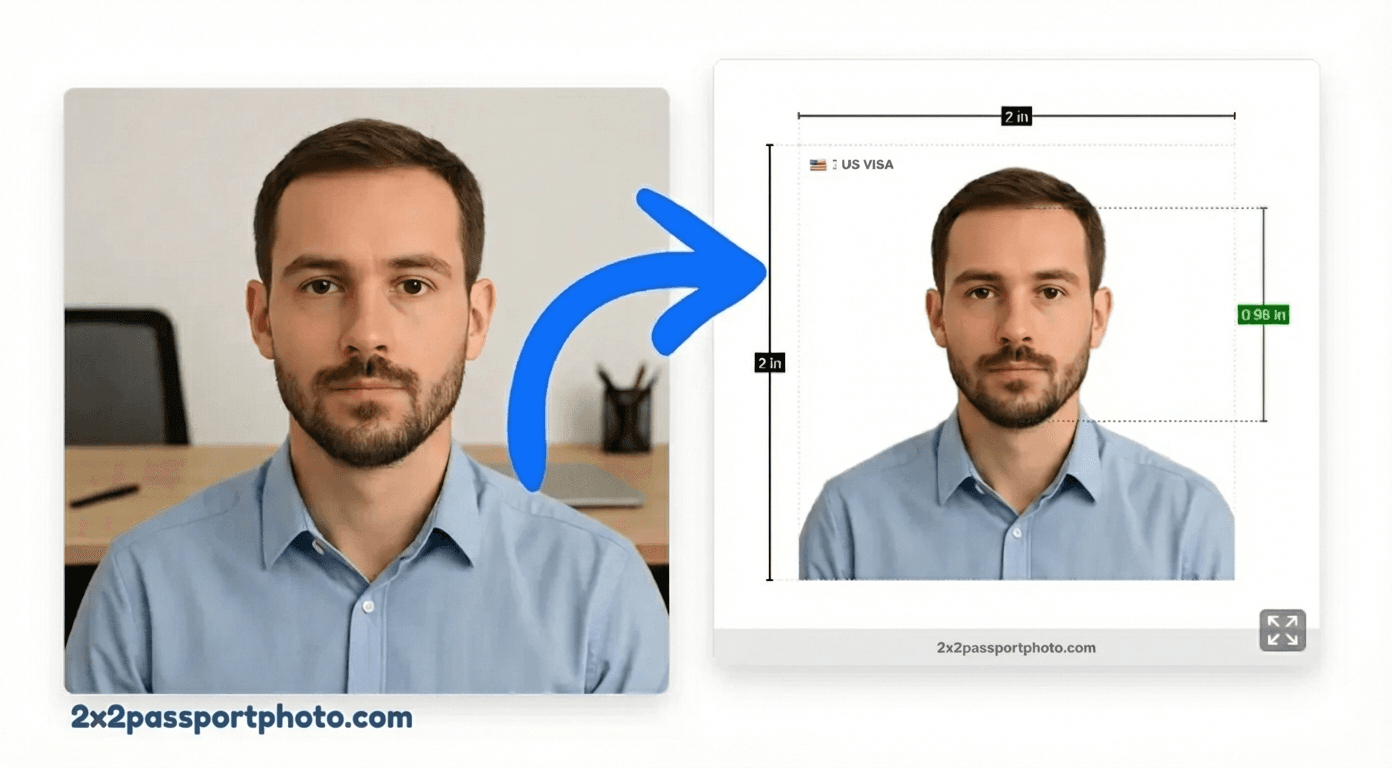
- Automatic face detection and alignment
- Visual guides for proper head positioning
- Background removal and replacement
- Exact 2×2 inch (600×600px at 300 DPI) output
- Instant preview before download
Create Your 2×2 Passport Photo
Upload your photo and we'll automatically crop it to 2×2 inches with proper alignment.
Upload Your Photo
Upload a photo from your device. We'll help you crop it, remove the background, and format it for your passport application.
Start Creating PhotoFree to try. HD download is a one-time $9.99.
Crop vs Resize: What's the Difference?
Understanding the difference between cropping and resizing is important for creating proper passport photos:
Cropping
- Removes parts of the image to change composition
- Changes the aspect ratio (e.g., from rectangular to square)
- Used to focus on a specific area (like your face)
- Doesn't change pixel density or quality
For passport photos: You need to crop to get the square 2×2 format and position your face correctly.
Resizing
- Changes image dimensions without removing content
- Maintains aspect ratio (unless forced)
- Can make image larger or smaller
- May affect quality if done incorrectly
For passport photos: Resizing adjusts the pixel dimensions and DPI, but you still need cropping to get the square format.
Face Alignment Tips
Proper face alignment is crucial for passport photo acceptance. Follow these tips:
- Center your face: Your face should be centered horizontally in the frame
- Head size: Your head (from chin to top) should be between 1 and 1 3/8 inches (25-35mm)
- Eye level: Your eyes should be positioned in the upper third of the photo
- Look straight: Face the camera directly, no tilting
- Shoulders visible: Include your shoulders in the crop
Tip
Accepted File Formats & Quality
Our cropping tool accepts a wide range of file formats:
- JPG/JPEG: Most common format, good for photos
- PNG: Higher quality, supports transparency
- HEIC: iPhone photos (automatically converted)
- WebP: Modern web format
Quality recommendations:
- Minimum: 600×600 pixels (for 2×2 at 300 DPI)
- Recommended: 1200×1200 pixels or higher
- File size: Up to 10MB (larger files may take longer to process)
Crop to 2×2 FAQs
What's the difference between cropping and resizing?
Cropping removes parts of the image to change its composition and aspect ratio, while resizing changes the dimensions without removing content. For 2×2 passport photos, you typically need to crop to get the square format and proper face positioning.
Can I crop a photo to 2×2 inches online?
Yes! Our online tool lets you crop any photo to exactly 2×2 inches. It includes face alignment guides to ensure your head is positioned correctly according to passport requirements.
What file formats can I crop?
Our tool accepts common image formats including JPG, JPEG, PNG, and HEIC. After cropping, you can download in JPG or PNG format at various quality levels.
Will cropping reduce photo quality?
Cropping itself doesn't reduce quality if done correctly. However, if you crop a very small portion of a low-resolution image, the final result may appear pixelated. We recommend starting with a high-quality photo (at least 600×600 pixels for a 2×2 output).
How do I ensure proper face alignment when cropping?
Our tool includes face alignment guides that show you exactly where your head should be positioned. The guides help ensure your head size meets passport requirements (1 to 1 3/8 inches from chin to top).
Can I crop multiple photos at once?
Currently, our tool processes one photo at a time to ensure quality and compliance. For multiple photos, you can process them individually or upgrade to Pro for batch processing features.
Is cropping to 2×2 free?
Yes! You can crop and preview your 2×2 photo for free. The HD download and print-ready file are a one-time $9.99 purchase — no subscription.
Related Guides & Tools
Passport Photo Editor
Full-featured online photo editor with AI
2×2 Passport Photo Maker
Complete guide to creating 2×2 passport photos
Resize Photo to 2×2
Resize with correct DPI and pixel dimensions
Print 2×2 Passport Photos
How to print your cropped photos
2×2 Passport Photo Template
Use a template for print-ready layouts
General 2×2 Photo
Universal 2×2 inch photo format