Student ID Photo Requirements
Official photo requirements for United States passport applications. Follow these specifications exactly to ensure your photo is accepted. Requirements may vary by school or university
2×2 Passport Photo Size Requirements
The required 2×2 inch passport photo size must measure exactly 51×51 mm with head height between 1 inch and 1 3/8 inches.
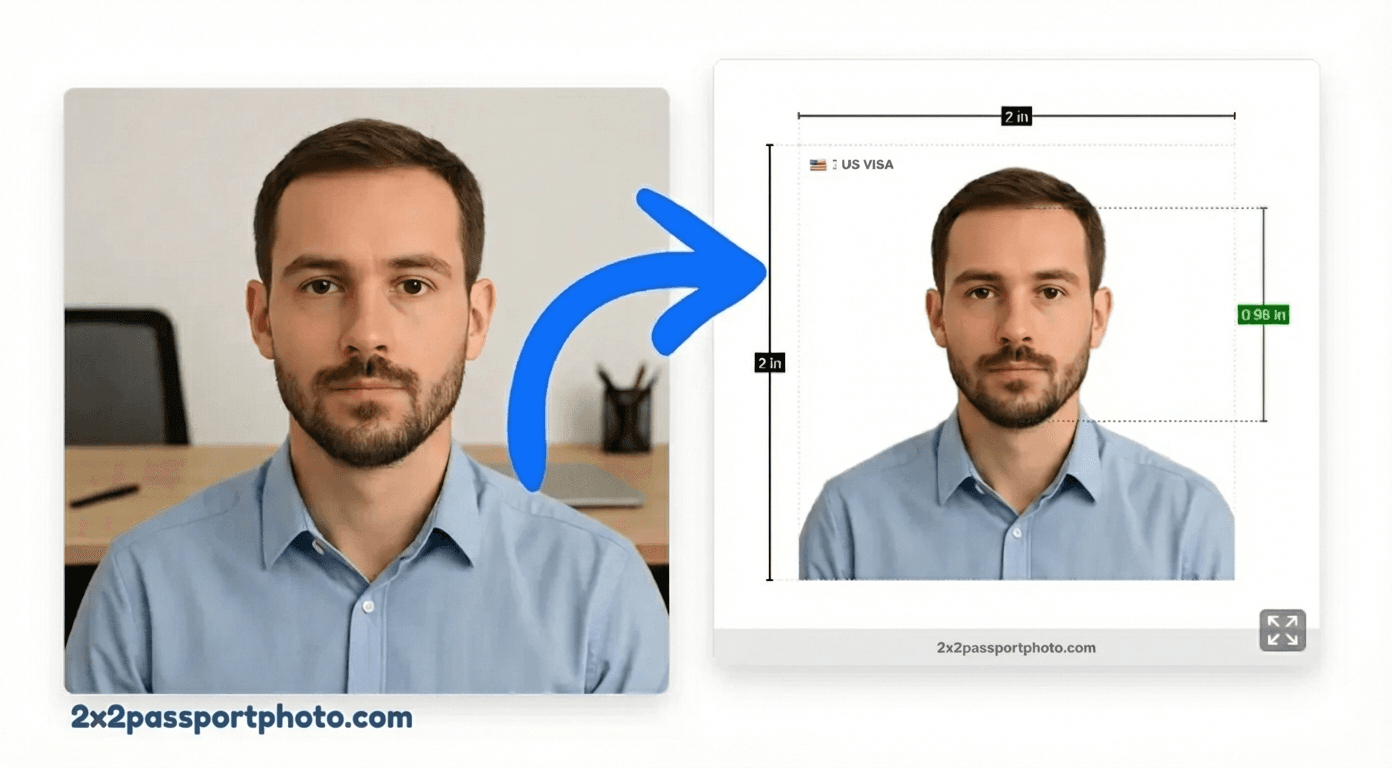
Official Photo Size
The photo must be exactly 2×2. This is a critical requirement—photos that don't match the exact dimensions will be rejected.
| Inches | 2×2 |
| Millimeters | 51×51 |
| Pixels (300 DPI) | 600×600 px |
Tip
Background & Lighting
Background: Plain white or light-colored. The background must be uniform with no shadows, patterns, or other people visible.
- No shadows on the background or your face
- No patterns, textures, or decorations
- No other people or objects visible
- Uniform color throughout
- Even lighting with no harsh shadows
Face & Head Size Rules
Head size: 1 to 1 3/8 inches (25-35mm) from chin to top of head. Your face must be positioned correctly in the frame.
- Face the camera directly (no tilting)
- Expression: Neutral expression or slight smile (check with your school)
- Eyes open and clearly visible
- Head centered in the frame
- Shoulders visible in the photo
What You Can Wear (Glasses, Head Coverings)
Understanding what accessories and clothing are allowed:
- Glasses: Generally allowed if no glare
- Clothing: Regular clothing appropriate for school
- Head coverings are only allowed for religious purposes
- Head coverings must not cast shadows on your face
- Your face must be fully visible from bottom of chin to top of forehead
Photo Quality Requirements
Sharp focus, high resolution (300 DPI), color photo preferred
- Sharp focus with no blur
- High resolution (minimum 300 DPI for printing)
- No filters or digital alterations
- Color photo (no black and white)
- Recent photo (taken within last 6 months)
Common Rejection Reasons
Photos that don't meet these requirements will be rejected, delaying your application. Common issues specific to United States general applications:
- Wrong photo size (not 2×2)
- Incorrect background (not plain white or light-colored)
- Wrong head size (not 1 to 1 3/8 inches (25-35mm) from chin to top of head)
- Poor photo quality (blurry or pixelated)
- Wrong expression (Neutral expression or slight smile (check with your school))
- Shadows on face or background
- Photo too old (taken more than 6 months ago)
- Digital alterations or filters
- Wrong size (not 2×2 inches)
- Poor photo quality or blurry image
- Inappropriate background
- Extreme expression (too much smiling or frowning)
- Photo too old
Local Notes for United States
- US passport photos must be taken within the last 6 months
- No uniforms or camouflage clothing allowed
- Professional photo studios often provide compliant photos
- Requirements may vary by school or university
- Some schools allow slight smiles, others require neutral expression
- Check with your specific institution for exact requirements
- Photo should be recent (within 6-12 months)
- Professional appearance recommended
Printing Tips for United States
- Print on 4×6 inch photo paper at 300 DPI
- Most US photo printing services (Walgreens, CVS) can print passport photos
- Cut photos to exactly 2×2 inches with no white borders
Create a United States Passport Photo Online
Use our tool to create a compliant general photo. We'll automatically:
- Crop to exactly 2×2
- Fix background to plain white or light-colored
- Ensure proper head size (1 to 1 3/8 inches (25-35mm) from chin to top of head)
- Align face correctly
- Export at 300 DPI for print quality
Create Your Passport Photo
Upload your photo and we'll make it compliant with United States requirements
Free preview • $9.99 one-time HD download
Student ID Photo Requirements FAQs
What size is a student ID photo?
Most US schools and universities require student ID photos to be 2×2 inches (51×51 mm), or 600×600 pixels at 300 DPI. However, always check with your specific institution as requirements may vary.
What background color is required for student ID photos?
Most schools require a plain white or light-colored background. Some may accept light blue or gray. Check with your school's specific requirements.
Can I smile in my student ID photo?
This varies by institution. Some schools allow a slight smile, while others require a neutral expression. It's best to check with your school's photo requirements before taking the photo.
Can I wear glasses in my student ID photo?
Generally yes, as long as there's no glare obscuring your eyes. Some schools may prefer you remove glasses. Check with your institution's specific requirements.
How recent must my student ID photo be?
Most schools require photos to be taken within the last 6-12 months. Check with your specific institution for their requirements.
Can I take a student ID photo at home?
Yes! You can take a student ID photo at home using your smartphone, then use our tool to crop and adjust it to meet the requirements. Make sure you have good lighting and follow your school's specific guidelines.
What should I wear for my student ID photo?
Wear regular, appropriate clothing for school. Avoid uniforms, camouflage, or clothing that might be considered inappropriate. Solid colors work best.
Do student ID photos need to be in color?
Most schools require color photos, though some may accept black and white. Check with your institution to be sure.